4. 스택과 큐
스택 : 데이터를 일시적으로 쌓아 놓는 자료구조, LIFO 구조(Last In First Out)
LIFO 구조 : 마지막에 들어온 데이터가 먼저 나가는 구조
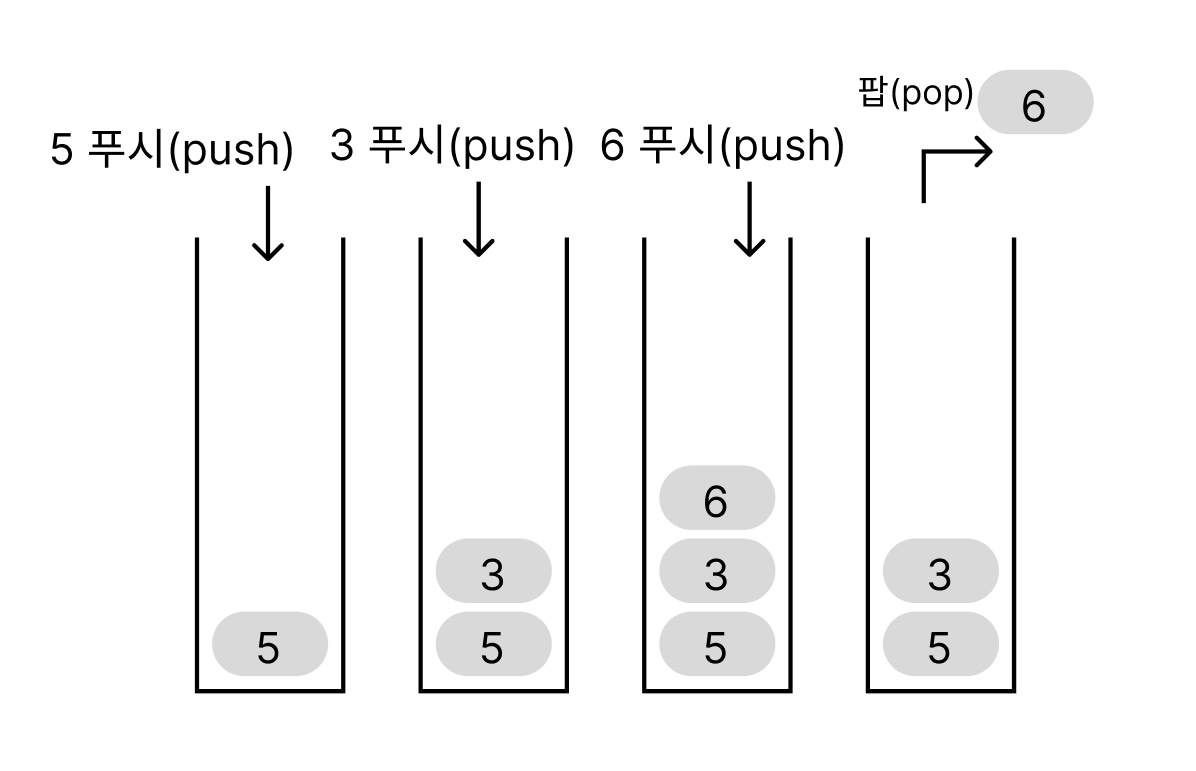
그렇다면 스택은 어디서 사용할까?
스택은 자바 프로그램에서 메서드를 호출하고 실행할 때 프로그램 내부에서 스택을 사용한다.
스택을 코드로 구현해 보겠다. 일단 스택의 기본 구조를 위해 스택을 생성할 때 용량을 결정하는 고정 길이 스택을 만들겠다.
이 스택은 Int형만 담는 스택이다.
코드
public class IntStack {
	private int[] stk; // 스택용 배열
	private int capacity; // 스택 용량
	private int ptr; // 스택 포인터

	// 실행 시 예외 : 스택이 비어 있음
	public class EmptyIntStackException extends RuntimeException {
		public EmptyIntStackException() {}
	}

	// 실행 시 예외 : 스택이 가득 참
	public class OverflowIntStackException extends RuntimeException {
		public OverflowIntStackException() {}
	}

	// 생성자
	public IntStack(int maxlen) {
		ptr = 0;
		capacity = maxlen;
		try {
			stk = new int[capacity]; // 스택 본체용 배열을 생성
		}catch(OutOfMemoryError e) { // 생성할 수 없음
			capacity = 0;
		}
	}


	// 스택에 x를 푸시
	public int push(int x) throws OverflowIntStackException {
		if(ptr >= capacity)
			throw new OverflowIntStackException();
		return stk[ptr++] = x;
	}

	// 스택에서 데이터를 팝(꼭대기에 있는 데이터를 꺼냄)
	public int pop() throws EmptyIntStackException {
		if(ptr <= 0)
			throw new EmptyIntStackException();
		return stk[--ptr];
	}

	public int peek() throws EmptyIntStackException {
		if(ptr <= 0)
			throw new EmptyIntStackException();
		return stk[ptr - 1];
	}

	public void clear() {
		ptr = 0;
	}

	// 스택에서 x를 찾아 인덱스(없으면 -1)를 반환
	public int indexOf(int x) {
		for(int i = ptr - 1; i >= 0; i--) // 꼭대기 쪽부터 선형 검색
			if(stk[i] == x)
				return i; // 검색 성공
		return -1; // 검색 실패
	}

	// 스택의 용량을 반환
	public int getCapacity() {
		return capacity;
	}

	// 스택에 쌓여 있는 데이터 개수를 반환
	public int size() {
		return ptr;
	}

	// 스택이 비어 있는가?
	public boolean isEmpty() {
		return ptr <= 0;
	}

	// 스택이 가득 찼는가?
	public boolean isFull() {
		return ptr >= capacity;
	}

	// 스택 안의 모든 데이터를 바닥에서 꼭대기 순서로 출력
	public void dump() {
		if(ptr <= 0)
			System.out.println("스택이 비어 있습니다.");
		else {
			for(int i = 0; i < ptr; i++)
				System.out.print(stk[i] + " ");
			System.out.println();
		}
	}
}
- 스택용 배열 stk : 푸시된 데이터를 저장하는 스택용 배열
- 스택 포인터 ptr : 스택에 쌓여 있는 데이터 수를 나타내는 필드
- 스택 용량 : 스택의 용량(스택에 쌓을 수 있는 치대 데이터 수)
- 생성자 : 스택용 배열 본체를 생성하는 등의 준비 작업을 한다.
- 팝 메서드 pop : 스택의 꼭대기에 있는 데이터를 팝하고 그 값을 반환하는 메서드
- 푸시 메서드 push : 스택에 데이터를 푸시하는 메서드
- 피크 메서드 peek : 스택의 꼭대기에 있는 데이터를 보는 메서드
- clear 메서드 : 스택에 쌓여 있는 모든 데이터를 한 번에 삭제하는 메서드. 스택에서 푸시하고 팝하는 모든 작업은 스택 포인터를 바탕으로 이루어지기 때문에 ptr 값만 0으로바꿔주면 된다.
- 검색 메서드 indexOf
- 용량 확인하는 메서드 getCapacity
이제 스택을 사용하는 프로그램을 간단히 switch문으로 만들어 보겠다.
package practice4;
import java.util.Scanner;


public class IntStackTester {
    public static void main(String[] args) {
        Scanner sc = new Scanner(System.in);
        IntStack s = new IntStack(64);

        while(true) {
            System.out.println();
            System.out.printf("현재 데이터 개수: %d / %d\n", s.size(), s.getCapacity());
            System.out.print("(1) 푸시 (2) 팝 (3) 피크 (4) 검색 (0) 덤프 종료 : ");

            int menu = sc.nextInt();
            if(menu == 0) break;

            int x;
            switch (menu) {
            case 1:
                System.out.print("데이터: ");
                x = sc.nextInt();
            	if(s.isFull()) {
            		System.out.println("스택이 가득찼습니다.");
            	}else {
            		s.push(x);
            	}
                break;

            case 2:
                if(s.isEmpty()) {
                	System.out.println("스택이 비어있습니다.");
                }else {
                    x = s.pop();
                    System.out.println("팝한 데이터는 " + x + "입니다.");
                }
                break;

            case 3:
            	if(s.isEmpty()) {
            		System.out.println("스택이 비어 있습니다.");

                } else {
                	x = s.peek();
                    System.out.println("피크한 데이터는 " + x + "입니다.");
                }
                break;

            case 4:
            	if(s.isEmpty()) {
            		System.out.println("스택이 비어 있습니다.");
            	}else {
            		System.out.print("검색할 정수를 입력하세요: ");
            		int num = sc.nextInt();

            		if(s.indexOf(num) == -1) {
            			System.out.println("해당 정수는 스택에 없습니다.");
            		}else {
            			System.out.println("해당 정수의 인덱스는 " + s.indexOf(num) + "입니다.");
            		}

            	}
            	break;

            case 0:
                s.dump();
                break;
            }
        }
    }
}
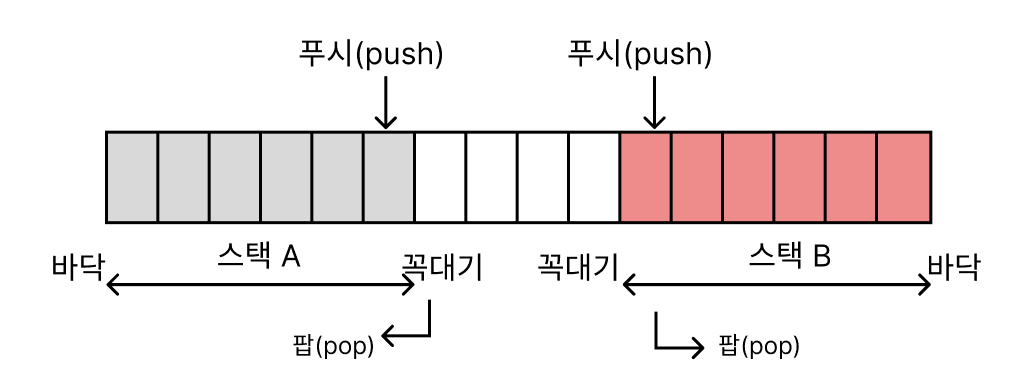
그 다음 하나의 배열을 공유해 2개의 스택을 구현하는 int형 데이터용 스택 클래스를 구현해 보겠다.
package practice4;

public class OneArrTwoStack {
	  private int[] stk; // 공유 배열
	    private int capacity; // 전체 배열 용량
	    private int ptr1; // 스택1 포인터 (왼쪽에서 증가)
	    private int ptr2; // 스택2 포인터 (오른쪽에서 감소)

	    // 실행 시 예외 : 스택이 비어 있음
	    public class EmptyIntStackException extends RuntimeException {
	        public EmptyIntStackException() {}
	    }

	    // 실행 시 예외 : 스택이 가득 참
	    public class OverflowIntStackException extends RuntimeException {
	        public OverflowIntStackException() {}
	    }

	    // 생성자
	    public OneArrTwoStack(int maxlen) {
	        capacity = maxlen;
	        ptr1 = 0;           // 스택1은 배열의 시작(0)부터 시작
	        ptr2 = capacity;    // 스택2는 배열의 끝(capacity)부터 시작
	        try {
	            stk = new int[capacity]; // 공유 배열 생성
	        } catch(OutOfMemoryError e) {
	            capacity = 0;
	        }
	    }

	    // 스택1에 x를 푸시
	    public int push1(int x) throws OverflowIntStackException {
	        if(ptr1 >= ptr2) // 두 스택이 만나면 오버플로우
	            throw new OverflowIntStackException();
	        return stk[ptr1++] = x;
	    }

	    // 스택2에 x를 푸시
	    public int push2(int x) throws OverflowIntStackException {
	        if(ptr1 >= ptr2) // 두 스택이 만나면 오버플로우
	            throw new OverflowIntStackException();
	        return stk[--ptr2] = x;
	    }

	    // 스택1에서 데이터를 팝
	    public int pop1() throws EmptyIntStackException {
	        if(ptr1 <= 0)
	            throw new EmptyIntStackException();
	        return stk[--ptr1];
	    }

	    // 스택2에서 데이터를 팝
	    public int pop2() throws EmptyIntStackException {
	        if(ptr2 >= capacity)
	            throw new EmptyIntStackException();
	        return stk[ptr2++];
	    }

	    // 스택1의 꼭대기 데이터를 확인
	    public int peek1() throws EmptyIntStackException {
	        if(ptr1 <= 0)
	            throw new EmptyIntStackException();
	        return stk[ptr1 - 1];
	    }

	    // 스택2의 꼭대기 데이터를 확인
	    public int peek2() throws EmptyIntStackException {
	        if(ptr2 >= capacity)
	            throw new EmptyIntStackException();
	        return stk[ptr2];
	    }

	    // 스택1을 비움
	    public void clear1() {
	        ptr1 = 0;
	    }

	    // 스택2를 비움
	    public void clear2() {
	        ptr2 = capacity;
	    }

	    // 모든 스택을 비움
	    public void clearAll() {
	        ptr1 = 0;
	        ptr2 = capacity;
	    }

	    // 스택1에서 x를 찾아 인덱스(없으면 -1)를 반환
	    public int indexOf1(int x) {
	        for(int i = ptr1 - 1; i >= 0; i--) // 꼭대기 쪽부터 선형 검색
	            if(stk[i] == x)
	                return i; // 검색 성공
	        return -1; // 검색 실패
	    }

	    // 스택2에서 x를 찾아 인덱스(없으면 -1)를 반환
	    public int indexOf2(int x) {
	        for(int i = ptr2; i < capacity; i++) // 꼭대기 쪽부터 선형 검색
	            if(stk[i] == x)
	                return i; // 검색 성공
	        return -1; // 검색 실패
	    }

	    // 전체 배열의 용량을 반환
	    public int getCapacity() {
	        return capacity;
	    }

	    // 사용 가능한 용량을 반환
	    public int getAvailableCapacity() {
	        return ptr2 - ptr1;
	    }

	    // 스택1에 쌓여 있는 데이터 개수를 반환
	    public int size1() {
	        return ptr1;
	    }

	    // 스택2에 쌓여 있는 데이터 개수를 반환
	    public int size2() {
	        return capacity - ptr2;
	    }

	    // 스택1이 비어 있는가?
	    public boolean isEmpty1() {
	        return ptr1 <= 0;
	    }

	    // 스택2가 비어 있는가?
	    public boolean isEmpty2() {
	        return ptr2 >= capacity;
	    }

	    // 전체 스택이 가득 찼는가?
	    public boolean isFull() {
	        return ptr1 >= ptr2;
	    }

	    // 스택1 안의 모든 데이터를 바닥에서 꼭대기 순서로 출력
	    public void dump1() {
	        if(ptr1 <= 0)
	            System.out.println("스택1이 비어 있습니다.");
	        else {
	            System.out.print("스택1: ");
	            for(int i = 0; i < ptr1; i++)
	                System.out.print(stk[i] + " ");
	            System.out.println();
	        }
	    }

	    // 스택2 안의 모든 데이터를 바닥에서 꼭대기 순서로 출력
	    public void dump2() {
	        if(ptr2 >= capacity)
	            System.out.println("스택2가 비어 있습니다.");
	        else {
	            System.out.print("스택2: ");
	            for(int i = capacity - 1; i >= ptr2; i--)
	                System.out.print(stk[i] + " ");
	            System.out.println();
	        }
	    }

	    // 전체 배열 상태를 출력 (디버깅용)
	    public void dumpAll() {
	        System.out.println("=== 전체 배열 상태 ===");
	        System.out.println("배열 크기: " + capacity);
	        System.out.println("스택1 포인터: " + ptr1);
	        System.out.println("스택2 포인터: " + ptr2);
	        System.out.println("사용 가능 공간: " + getAvailableCapacity());

	        dump1();
	        dump2();

	        System.out.print("전체 배열: [");
	        for(int i = 0; i < capacity; i++) {
	            if(i < ptr1) {
	                System.out.print(stk[i] + "(S1)");
	            } else if(i >= ptr2) {
	                System.out.print(stk[i] + "(S2)");
	            } else {
	                System.out.print("empty");
	            }
	            if(i < capacity - 1) System.out.print(", ");
	        }
	        System.out.println("]");
	        System.out.println("==================");
	    }
}
큐 : 스택과 마찬가지로 데이터를 일시적으로 쌓아 놓는 자료구조. 하지만 스택과는 다르게 FIFO 구조(First In First Out) 선입선출 구조이다.
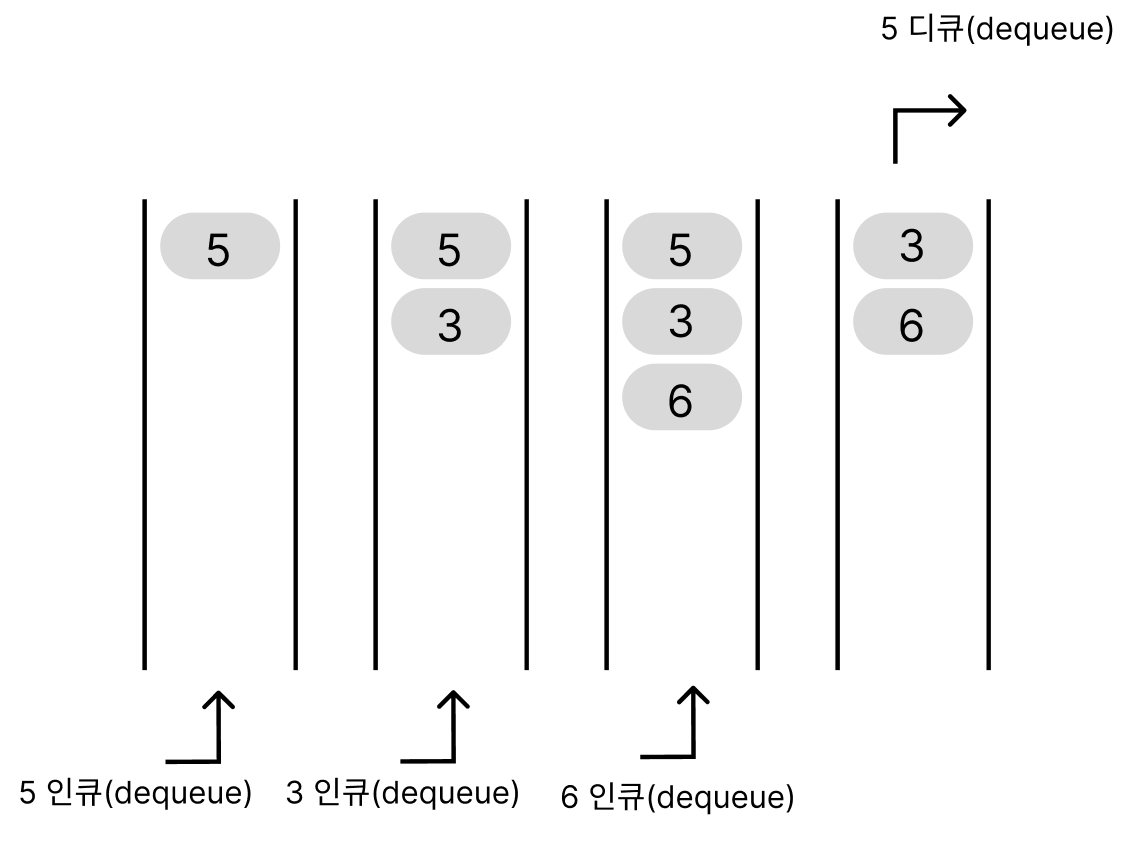
배열로 큐 만들기
스택과 마찬가지로 배열을 이용해 큐를 구현할 수 있다. 복잡도 O(n)
코드
public class IntArrayQueue {
	private int[] que; // 큐용 배열
	private int capacity; // 큐 용량
	private int num; // 현재 데이터 개수

	// 실행 시 예외 : 큐가 비어 있음
	public class EmptyIntQueueException extends RuntimeException {
		public EmptyIntQueueException() {}
	}

	// 실행 시 예외 : 큐가 가득 참
	public class OverflowIntQueueException extends RuntimeException {
		public OverflowIntQueueException() {}
	}

	// 생성자
	public IntArrayQueue(int maxlen) {
		num = 0;
		capacity = maxlen;

		try {
			que = new int[capacity]; // 큐 본체용 배열 생성
		} catch (Exception e) {
			capacity = 0;
		}
	}

	// 큐에 x를 인큐
	public int enque(int x) throws OverflowIntQueueException {
		if(num >= capacity)
			throw new OverflowIntQueueException();
		return que[num++] = x;
	}

	public int deque() throws EmptyIntQueueException {
		if(num <= 0)
			throw new EmptyIntQueueException();
		int result = que[0]; // 첫 번째 원소 저장

		// 모든 원소를 한 칸씩 앞으로 이동
		for(int i = 0; i <num - 1; i++) {
			que[i] = que[i + 1];
		}

		num--; // 데이터 개수 감소
		return result;
	}

	// 큐의 첫 번째 데이터를 확인 (제거하지 않음)
    public int peek() throws EmptyIntQueueException {
        if(num <= 0)
            throw new EmptyIntQueueException();
        return que[0];
    }

	public void clear() {
		num = 0;
	}

	// 큐에서 x를 찾아 인덱스(없으면 -1)를 반환
    public int indexOf(int x) {
        for(int i = 0; i < num; i++) {
            if(que[i] == x)
                return i; // 검색 성공
        }
        return -1; // 검색 실패
    }


    // 큐의 용량을 반환
    public int getCapacity() {
        return capacity;
    }

    // 큐에 쌓여 있는 데이터 개수를 반환
    public int size() {
        return num;
    }

    // 큐가 비어 있는가?
    public boolean isEmpty() {
        return num <= 0;
    }

    // 큐가 가득 찼는가?
    public boolean isFull() {
        return num >= capacity;
    }

    // 큐 안의 모든 데이터를 첫 번째부터 마지막 순서로 출력
    public void dump() {
        if(num <= 0)
            System.out.println("큐가 비어 있습니다.");
        else {
            System.out.print("큐 내용: ");
            for(int i = 0; i < num; i++)
                System.out.print(que[i] + " ");
            System.out.println();
        }
    }

}
위에서 배열을 사용한 선형 방식은 dequeue를 할 때마다 배열에 있는 모든 원소를 앞으로 한 칸씩 이동시켜야 하는 비효율적인 구조이다. 좀 더 효율적인 방법이 존재하는데 바로 큐를 원형 구조로 만들어서 배열의 맨 뒤가 맨 앞과 연결되었다고 보는 원형 큐가 있다.
이번에는 배열 요소를 앞쪽으로 옮기지 않는 링 버퍼(원형 큐)에 대해서 알아보겠다.
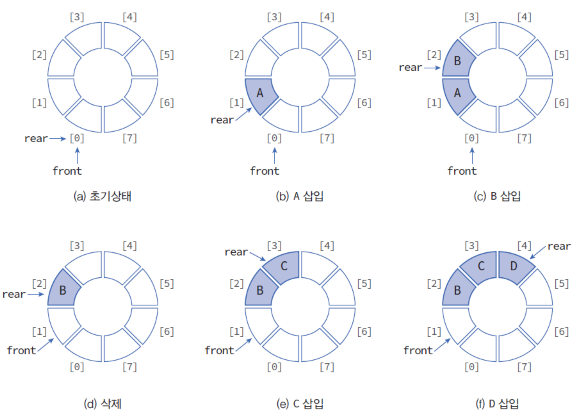
이렇게 그림처럼 큐를 구현하면 프런트값과 리어값을 업데이트 하면서 인큐와 디큐를 수행하기 때문에 선형 큐에서 발생한 요소 이동 문제를 해결할 수 있다. 물론 처리의 복잡도는 O(1)이다.
이제 코드를 통해서 원형 큐에 대해 알아보겠다.
코드
public class IntQueue {
	private int[] que; // 큐용 배열
	private int capacity; // 큐 용량
	private int num; // 현재 데이터 개수
	private int front; // 맨 앞의 요소 커서
	private int rear; // 맨 뒤의 요소 커서

	// 실행 시 예외 : 큐가 비어 있음
	public class EmptyIntQueueException extends RuntimeException {
		public EmptyIntQueueException() {}
	}

	// 실행 시 예외 : 큐가 가득 참
	public class OverflowIntQueueException extends RuntimeException {
		public OverflowIntQueueException() {}
	}

	// 생성자
	public IntQueue(int maxlen) {
		num = front = rear = 0;
		capacity = maxlen;

		try {
			que = new int[capacity]; // 큐 본체용 배열 생성
		} catch (Exception e) {
			capacity = 0;
		}
	}

	// 큐에 x를 인큐
	public int enque(int x) throws OverflowIntQueueException {
		if(num >= capacity)
			throw new OverflowIntQueueException();
		que[rear++] = x;
		num++;
		if(rear == capacity)
			rear = 0;
		return x;
	}

	// 디큐
	public int deque() throws EmptyIntQueueException {
		if(num <= 0)
			throw new EmptyIntQueueException();

		int x = que[front++];
		num--;

		if(front == capacity)
			front = 0;
		return x;
	}

	public int peek() throws EmptyIntQueueException {
		if(num <= 0)
			throw new EmptyIntQueueException();
		return que[front];
	}

	public void clear() {
		num = front = rear = 0;
	}

	// 큐에서 x를 찾아 인덱스(없으면 -1)를 반환
    public int indexOf(int x) {
        for(int i = 0; i < num; i++) {
            int idx = (i + front) % capacity;
            if(que[idx] == x)
            	return idx;
        }
        return -1; // 검색 실패
    }

    // 큐의 용량을 반환
    public int getCapacity() {
        return capacity;
    }

    // 큐에 쌓여 있는 데이터 개수를 반환
    public int size() {
        return num;
    }

    // 큐가 비어 있는가?
    public boolean isEmpty() {
        return num <= 0;
    }

    // 큐가 가득 찼는가?
    public boolean isFull() {
        return num >= capacity;
    }

    // 큐 안의 모든 데이터를 첫 번째부터 마지막 순서로 출력
    public void dump() {
        if(num <= 0)
            System.out.println("큐가 비어 있습니다.");
        else {
            for(int i = 0; i < num; i++)
            	System.out.print(que[(i + front) % capacity] + " ");
            System.out.println();
        }
    }


}
링 버퍼는 '오래된 데이터를 버리는' 용도로 사용할 수 있다.